Monday, July 1, 2019

2019 iPhone 11 and iPhone XR CAD Renders Leak Again


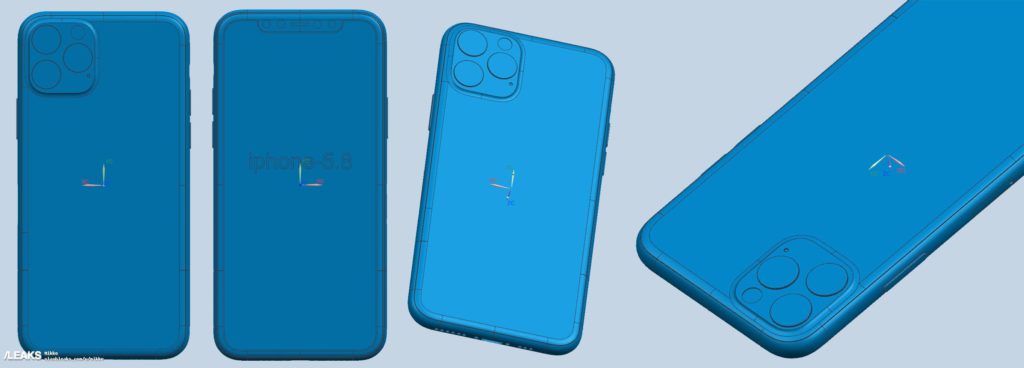
Alleged CAD renders of the 2019 iPhone 11, iPhone 11 Max, and iPhone XR has leaked online. The CAD renders once again confirm that the 2019 iPhone 11 lineup will feature triple rear cameras, with the iPhone XR featuring a dual-camera setup.

The notch on the 2019 iPhone series is also going to be of the same width as the one found on the iPhone X/XS series. Rumors do point to Apple using an upgraded TrueDepth sensor for improved Face ID performance.

Other details regarding the thickness of the devices are not a part of the leaked CAD renders. iPhone 11 CAD renders have already leaked before and the new ones don’t reveal anything new.

Plenty of leaks and renders have revealed almost everything about the 2019 iPhone 11 and iPhone XR. The highlight of the devices are going to be their improved camera setup, bigger batteries, and reverse wireless charging.

The addition of a third new camera on the 2019 iPhone 11 is rumored to be a 12MP ultra-wide angle. The iPhone XR is also gaining a second new camera lens but it is unclear if it is going to be an ultra-wide angle lens or a 2x optical zoom sensor.


Externally, the new iPhones are going to pack the same design as the iPhone X/XS series with only some minor changes. Apple is rumored to switch to a single frosted glass panel which should give these phones a fresh new look. The 2019 iPhone XR is also expected to come in two new colors.

Like every year, Apple will be unveiling the 2019 iPhone lineup in September this year.Sponsor ads:

Gihosoft RePicvid Free Photo Recovery Software provides a free photo recovery software for windows to help users recover the deleted or lost photo for free.

If you lost data after you updated to a new iPhone, you can always use Gihosoft iPhone Data Recovery to get the data back from the old iPhone or backup.You may also like: iphonerecovery.com


[Via SlashLeaks]

Thursday, June 6, 2019

How to Bypass Samsung Bypass APK with Rootjunky


How to Bypass Samsung Bypass APK with Rootjunky

Rootjunky helps you to bypass factory reset protection (FRP) on Samsungs devices. FRP is a protection meant to prevent unauthorized use of your device, especially if it was stolen. FRP will prevent it from being used except the Google account used on the Samsung device is provided.

However, there are a time when you need to bypass the Google FRP lock on Samsung device. If you have just been given the device or you bought it from the original owner without the FRP already removed, you could have a problem using the Samsung device.
Requirements to Bypass Samsung FRP via Rootjunky:

You need to prepare extract devices to complete the FRP bypass process:


A USB drive


An OTG cable (this is not the same from a USB cable)
How to Use Rootjunky Samsung Bypass APK?

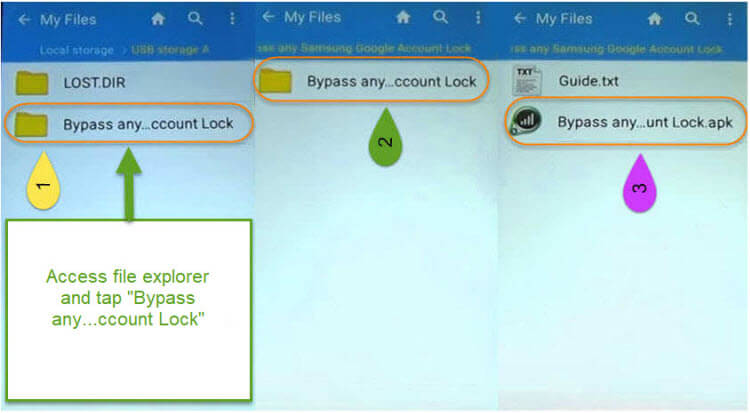
Step 1: Click here to download the Rootjunky APK on your computer. Connect your USB drive to computer and copy the APK to the drive.

Step 2: Open your Android device and try to set it up. When you ‘re in the “Verifying your account” screen, use the OTG cable to connect your device to USB drive.


Step 3: Open the file explorer on your Android device and access the APK from the USB drive.

Step 4: Select the right APK file you downloaded to install it into your Android device.Sponsor ads:

Gihosoft RePicvid Free Photo Recovery Software provides a free photo recovery software for windows to help users recover the deleted or lost photo for free.

If you lost data after you updated to a new iPhone, you can always use Gihosoft iPhone Data Recovery to get the data back from the old iPhone or backup.You may also like: iphonerecovery.com

If you use android phones, please choose Gihosoft Android Data Recovery.With Gihosoft Android Data Recovery, no longer afraid of data loss!

iPhone Manager:Get the ultimate Gihosoft iPhone Manager. Free download for PC/Mac.


Step 5: When the “Install blocked” warning window appears, tap “SETTINGS”.

Step 6: Check the “Unknown sources”. Then check “Allow this installation only” and click “OK” to proceed.


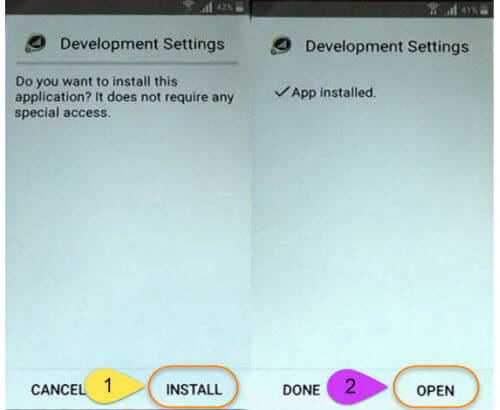
Step 7: Click “INSTALL” to proceed. When it completes, click “OPEN”.


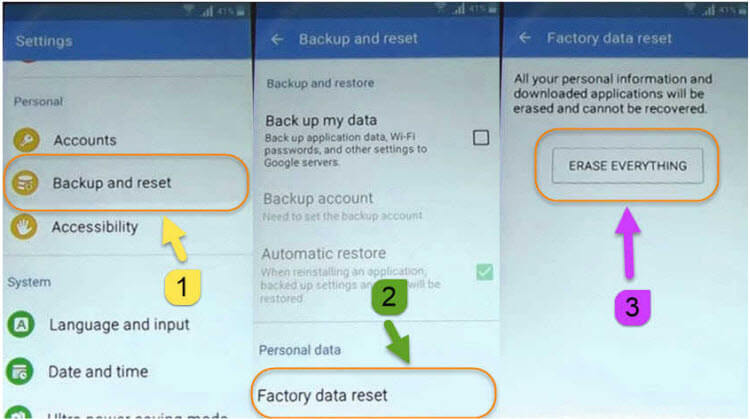
Step 8: Now open the “Settings” app on your device. Find and perform the factory reset on your device. This will remove the old FRP account from your device.


Step 9: When your device reboots, you will start the setup again. This time, it won’t ask to verify the Google account. You can set up your device as a brand new one.

Cons of This Way:


The APK has not been updated for a long time. You may find it inoperative for your device.


You may be stuck during the process because the operation is different on different models.


There is no after service provided by Rootjunky.

Sunday, April 21, 2019

Alleged iPhone XI and XI Max Molds Show Triple Camera Layout


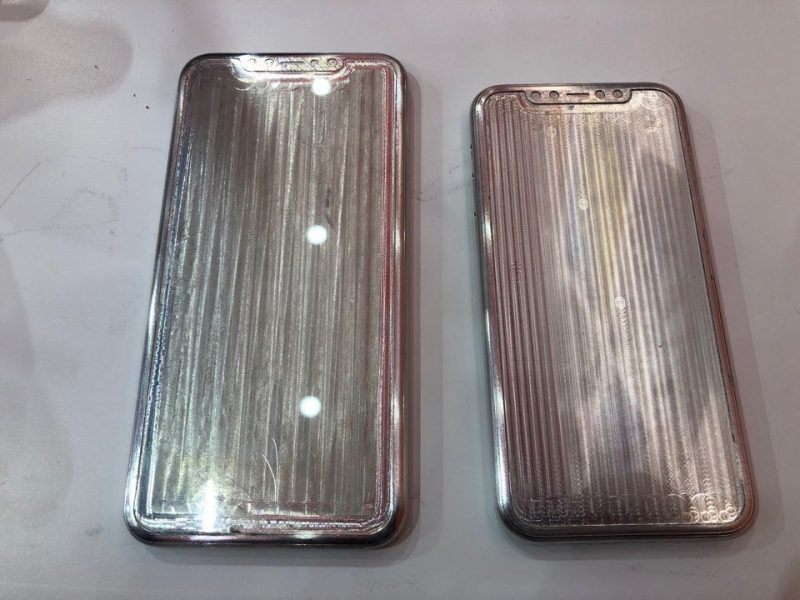
SlashLeaks posts an image that is alleged to be iPhone XI and XI Max molds for 3rd party case production.


These physical molds are presumably produced by case manufacturers based on leaked schematics to test early cases for the upcoming 2019 iPhones.


The front design is also shown on a Weibo post which may have been the original source for the images:


The square grouping of the triple-camera is consistent with other rumors and images that have leaked from the supply chain regarding Apple's upcoming iPhones. Gihosoft RePicvid Free Photo Recovery Software provides a free photo recovery software for windows to help users recover the deleted or lost photo for free.

If you lost data after you updated to a new iPhone, you can always use Gihosoft iPhone Data Recovery to get the data back from the old iPhone or backup.You may also like: iphonerecovery.com

Thursday, April 18, 2019

Apple Paid an Estimated $5-$6 Billion to Settle Qualcomm Dispute, Plus $8-$9 Per iPhone in Royalty Fees


Apple likely paid somewhere around $5 to $6 billion to settle its ongoing legal battle with Qualcomm, according to estimates shared today by UBS analyst Timothy Arcuri (via CNBC).


The $5 to $6 billion payment would have been for royalty fees that Apple had stopped paying over the course of its two year legal fight with Qualcomm.


Qualcomm may also be receiving between $8 and $9 per iPhone from Apple in ongoing patent royalties, a figure calculated based on guidance numbers that Qualcomm provided following the settlement. Qualcomm said that it expects its earnings per share to increase by $2.


Apple previously paid $7.50 in royalties, so at $8 to $9 per iPhone, Apple would be shelling out more cash than it did before.

Apple appears to have had no alternative but to settle with Qualcomm, as it had no other way to source 5G chips for its 2020 iPhone lineup. Apple initially planned to use Intel chips, but rumors suggested Intel wasn't meeting development goals, leading to tension between Apple and Intel.


Just hours after Apple and Qualcomm announced a settlement deal, Intel said that it was exiting the 5G smartphone modem business and would not be making 5G smartphone chips at all.


It's not entirely clear if Apple settled with Qualcomm because it knew of Intel's plan to abandon 5G chip development or if Intel made the decision after learning of Apple's settlement plans, but either way, it leaves Apple with no choice but to re-adopt Qualcomm chips for future iPhones.


Smartphone makers like Samsung will have 5G smartphones available starting this year, so Apple could not afford to delay the rollout of its 5G iPhones. Launching in 2020 already puts Apple somewhat behind, but 5G networks from U.S. carriers are still very much in development.


Following news of the settlement, Qualcomm's stock has gone up over 38 percent, marking a big win for the San Diego company. The agreement includes a six-year licensing deal along with a "multiyear chipset supply agreement."

It sounds like Apple will need to rely on Qualcomm for the foreseeable future, but Apple is working on its own modem chip technology, which may eventually allow it to drop Qualcomm as a modem chip supplier.Gihosoft RePicvid Free Photo Recovery Software provides a free photo recovery software for windows to help users recover the deleted or lost photo for free.

If you lost data after you updated to a new iPhone, you can always use Gihosoft iPhone Data Recovery to get the data back from the old iPhone or backup.You may also like: iphonerecovery.com

Tuesday, April 9, 2019

Apple Rumored to Use Mini LED Displays in 31.6-Inch iMac, Future iPads and Macs

Apple Rumored to Use Mini LED Displays in 31.6-Inch iMac, Future iPads and Macs


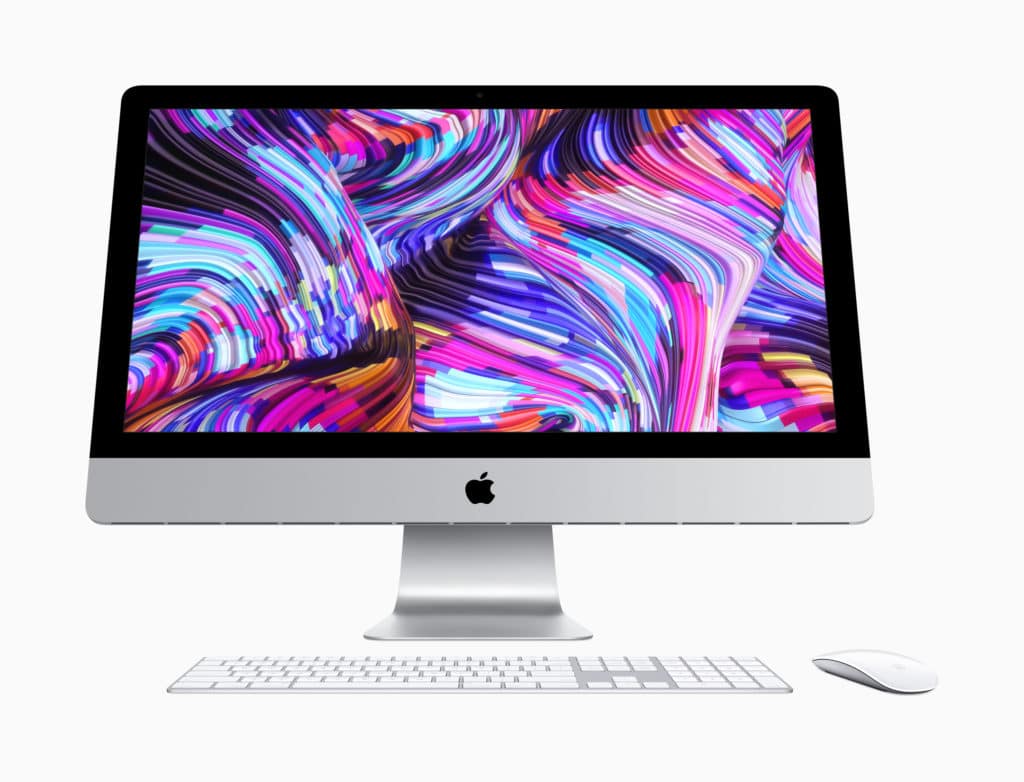
A DigiTimes report citing reputable analyst Ming-Chi Kuo says that Apple will be switching to Mini LED display technology for its upcoming iMacs. In his note yesterday, Kuo mentioned that he expects Apple to launch a 31.6-inch 6K display this year.

Today’s report also claims that Apple will be switching to mini LED display technology for its 2020 iPad and 2021 MacBook Pro lineup. As per Kuo, mini LED displays offer a wide color gamut, high contrast ratio, high dynamic range, and local dimming feature which make them far superior to LCD panels used by Apple in its iPad and iMac lineup.

The Japan-based Nichia will be supplying Apple backlit unit of about 500 LEDs that are about 600 microns in size.

Strictly speaking, this is a quasi-mini LED BLU because the chip size is much larger than those of standard mini LEDs, according to industry sources. However, the use of such a BLU will give opportunities for the supply chain to improve mini LED production in cost and yield rate, the sources noted.

For the iPad, more than 10,000 mini LEDs will be required which would be produced by Epistar. The LCD panel itself will be produced by LG Display. Along with these two, Radiant Opto-Electronics will also be supplying BLUs to Apple and the three companies are expected to be a part of the supply chain of the mini LED-backlit MacBook as well.
Our Take

While the report cites reputed analyst Ming-Chi Kuo, it is still recommended that it is taken with a pinch of salt. DigiTimes claims that Apple will be launching a 6K iMac, while Kuo expects Apple to simply launch a standalone 6K display. My bet is also on the latter as Apple has already refreshed its iMac lineup this year with faster internals and they are unlikely to get another refresh this year.

As for the switch to mini LEDs, it is something that only time will tell. If Apple does make the switch, we should see more such rumors and reports leak out.

[Via Digitimes]

Also Read:Top 25 Best Netflix Cookies for You to Use Netflix for Free 2019

Also Read:Top 10 iPhone Emulators for Windows PC, Mac and Android 2019

Also Read:Download Latest Samsung USB Drivers for Mobile Phones on Windows

Also Read:Download Korean Drama for Free 2019

Also Read:Websites Like PrimeWire

Monday, March 25, 2019

Apple News+ Fist Impressions: Big, Bold, and Beautiful

Apple News+ Fist Impressions: Big, Bold, and Beautiful


Apple News saw an upgrade today, thanks to the arrival of News+. But does a host of new content really warrant a monthly subscription?

The short answer to that question is, yes. As long as you actually want any of the content being offered. During its big unveiling, Apple said that if you subscribed to each of the pieces of content available through Apple News+ on an individual basis, you’d be spending $8,000 or more per month. I doubt anyone is actually paying that, but of course monthly subscriptions do make it a lot easier to reach content.

The idea here is sound: Apple wants to offer up all of this editorial and picturesque material for a relatively cheap amount per month. It’s an admirable effort, too, because a lot of what’s being offered is genuinely good stuff. The fact that you can get access to National Geographic, WIRED, The Hollywood Reporter, and much, much more for just $9.99 per month is great. Especially considering you’re getting the full experience — not just one story here, or a brief snippet there.

It’s a steal, and it’s a good one.

Let me just get this out of the way first: My first impression with Apple News+ is entirely on an iPhone XR. I haven’t upgraded my MacBook to the latest version of macOS just yet, and I don’t own an iPad (for now; I’m getting a new iPad mini soon). So while Apple wasn’t shy about touting the experience of News+ on the iPhone, I have no doubt whatsoever that the best possible experience is on a big(ger) screen.
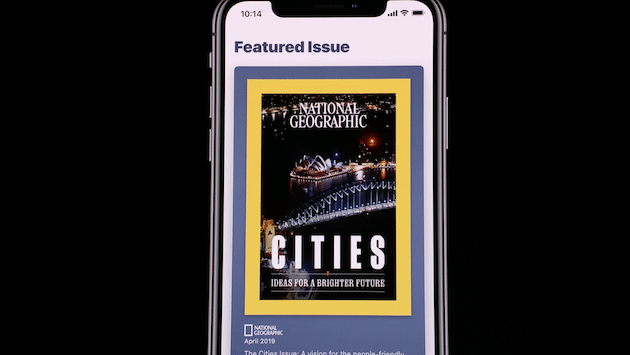


That being said, Apple News+ is beautiful. It’s big in content availability, and bold in its use of moving images to attract attention. It’s all of these things and more. Seeing shots of beautiful cities on the moving cover of Nat Geo is fantastic. And while I thought it would be strange at first, it’s genuinely nice to see this happening without me having to Force Touch it to happen.

Text is easy to read from one magazine to the next, and you can change the size as you see fit. There is no shift from Light to Dark mode, though. And there is no denying that photography in magazines is still one of the shining elements of the platform, and seeing it on an iPhone doesn’t disappoint at all. Being able to tap into a photo to see it up close and more detail is a nice, albeit expected, touch.

Open up the WIRED issue and watch as the cow’s head moves around while you move your iPhone around. It’s intense.

First impressions are brief, but can leave a lasting impact. It’s safe for me to say that News+ is a positive one. These are magazines that I’ve wanted to subscribe to in the past, but just haven’t wanted to spend the money for all of them at the same time. Being able to put them all together in one place for one low monthly fee is something I’m definitely not going to pass up.

But beyond that, Apple made the experience enjoyable in its typical fashion. Just having all of this content is one thing, but the reading experience is worthwhile, as are the beautiful images. Especially when they move and grab your attention. Layout is great, and so is navigating from one story to the next. It’s all quick and easy. It just works. And it looks great while doing it.

I’m looking forward to using News+ more in the future and watching it as it learns about me, what I like to read, and offering up even more for me to consume.


Also Read:jihosoft Free iPhone Data Recovery

Sponsor ads:

Gihosoft Free iPhone Data Recovery:https://www.gihosoft.com/iphone-data-recovery-free.html

Gihosoft iPhone Data Recovery Free

Free iPhone Data Recovery Software for Windows/Mac

Recover up to 12+ types of files, including contacts, SMS, photos, WhatsApp, Viber, notes, etc.

Restore lost data from iOS devices directly or from iTunes and iCloud backup

Recover iPhone data lost due to iOS upgrade/jailbreak, accidental deletion, device lost or broken

Support all the latest iPhone, iPad and iPod Touch

Both Free and Pro version.


If you lost data after you updated to a new iPhone, you can always use Gihosoft iPhone Data Recovery to get the data back from the old iPhone or backup.You may also like: iphonerecovery.com

Monday, March 18, 2019

How to Get iCloud Owner Info Free


Part 1. How to Get iCloud Owner Info Free?

One way that you can gain access to iCloud owner info is to unlock your iPhone. With that being said, unlock services are not free, and are not always safe. Still, if you wish to use this method, there are a few websites you can try:

1imeiphoneunlock.com

This service offers a safe, effective way to unlock your phone, without putting it at risk of being whitelisted in the Apple database. To unlock, all you need to do is fill out a short online form with your carrier, model, and IMEI number, provide payment, and wait for 1-2 days for the process to take place. This service, however, is not free.


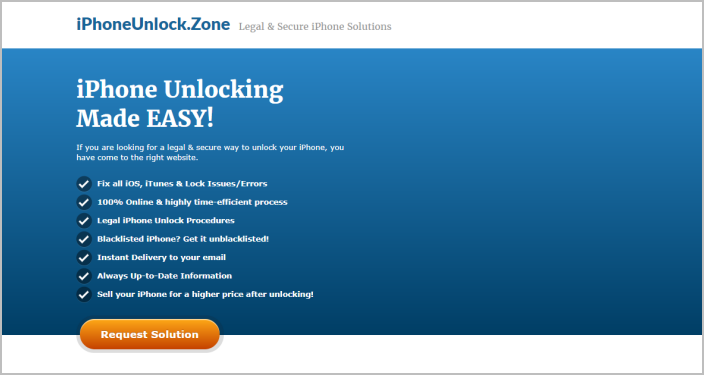
2iphoneunlock.zone

This website provides you with ideas for unlocking solutions. It may be helpful when it comes to get iCloud owner info free. They have checked more than 60 000 phones, and successfully unlocked 92% of them within the last three years.This service provides quick results, but again, is not free.


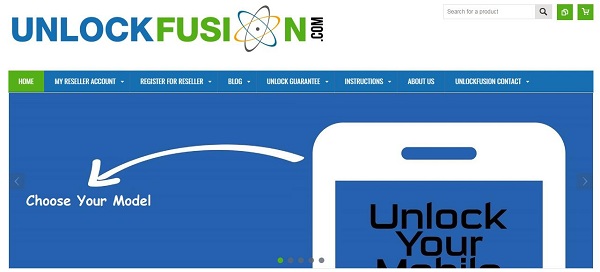
3unlockfusion.com

This website provides you with a variety of different unlocking solutions at different prices. You could try it to see if it can help you get iCloud owner info free and solve the problem. However, there is no guarantee that you can unlock successfully.


Part 2. How to Get Rid of the Account of the iCloud Owner

If you have recently purchased a used iPhone, you may need to remove the existing iCloud account before you can create your own. To do this, you will need to find the iCloud owner info free and use it to remove the account. Here’s how to remove the iCloud account if you have access to the owner info:

Step 1: Sign into iCloud with the owners Apple ID and passcode

Step 2: Go to “Find My iPhone”

Step 3: At the top of the screen, click on “All devices”

Step 4: Click on the device that you would like to remove from iCloud

Step 5: Click Erase and then Remove from Account


Part 3. Better Way to Remove iCloud Account without Password

If you want to remove an iCloud account, there’s an easier way than searching the globe for iCloud owner info free. With iMyFone LockWiper, you don’t need to have the owner info, or even a password - all you need is the software. iMyFone LockWiper provides users with a simple, easy to use method of completely removing their Apple ID or iCloud account. And the best part? You can use it even if you don't remember the Apple ID or password. In just a few simple clicks, you can erase any iCloud account from your iPhone without having the original owner info.Also Read:jihosoft Free iPhone Data Recovery

Sponsor ads:

Gihosoft Free iPhone Data Recovery:https://www.gihosoft.com/iphone-data-recovery-free.html

Gihosoft iPhone Data Recovery Free

Free iPhone Data Recovery Software for Windows/Mac

Recover up to 12+ types of files, including contacts, SMS, photos, WhatsApp, Viber, notes, etc.

Restore lost data from iOS devices directly or from iTunes and iCloud backup

Recover iPhone data lost due to iOS upgrade/jailbreak, accidental deletion, device lost or broken

Support all the latest iPhone, iPad and iPod Touch

Both Free and Pro version.

If you lost data after you updated to a new iPhone, you can always use Gihosoft iPhone Data Recovery to get the data back from the old iPhone or backup.You may also like: iphonerecovery.com
If you use android phones, please choose Gihosoft Android Data Recovery.

With Gihosoft Android Data Recovery, no longer afraid of data loss!

Must read:Youtube video downloader for pc

Gihosoft RePicvid Free Photo Recovery Software provides a free photo recovery software for windows to help users recover the deleted or lost photo for free.

Call of Duty: Mobile Now Available for Download for iPhone and Android

If you are a fan of battle royale games and first-person action shooters like PUBG and Fortnite, there’s a new game in town for you. Activis...