Monday, June 25, 2018

Apple releases the first public beta of iOS 12


Apple released this morning the first public beta of iOS 12 to its public beta testing group, allowing non-developers to test the software before its release in the fall. The first public beta of iOS 12 should match the second beta version of the developer, which was released last week.
Beta testers who have enrolled in Apple's beta test program will receive the iOS 12 beta update after installing the correct certificate on an iOS device.
Those who want to join the beta test program can register on the Apple beta test website, which allows users to access beta iOS, macOS and tvOS. Before you install a beta, make sure to create a full encrypted iTunes backup or an iCloud backup and make sure you install iOS 12 on a secondary device because the beta software is not always stable and may include bugs.
iOS 12 is a major update to the iOS operating system, featuring Group FaceTime, shared local multiplayer AR experiences, new Animoji, and a Memoji feature designed to allow you to create a custom Animoji that looks like you.
Sponsor Ads:
Gihosoft iPhone Data Recovery is a professional iPhone Data Recovery software to get back all your lost text message, photo, video, call history, note, contact and more from iPhone/iPad/iPod Touch. It offers a full solution to recover your lost data in different tough situations. Besides recovering data directly from iPhone, iPad and iPod touch, it also allows you to recover data from iCloud and iTunes backup files.


Tuesday, June 19, 2018

How to Downgrade to iOS 11 from iOS 12 Without Losing Files


If you are also like me who installed iOS 12 Beta 1 and want to go back to iOS 11 then this post is all about downgrading to iOS 11 from iOS 12.

iOS 12 is great! It is fast, full of features but at the same time, full of bugs. Since it is beta, we can not expect stable version of iOS 12 till September. This is the reason why I wanted to go back to iOS 11.

Downgrading was not easy back then. It required lots of effort & risk to do so. But today, you can easily downgrade to older iOS versions by following some simple steps that we will later mention in this post.

But first let’s talk about reason behind downgrading iOS 12 to iOS 11. Why should you downgrade to iOS 11 from iOS 12 Beta 1?
  1. Lots of Bugs
  2. Instant battery drainage
  3. No technical support from Apple
  4. Can not Jailbreak
  5. Missing features
  6. No support from 3rd party apps
  7. more…
You may also have faced any of these issues and want to downgrade to iOS 12 to iOS 11 without losing files then there is a very simple way. For this, you require an ipsw file & an iTunes.

How to Downgrade iOS 12 to iOS 11 Without Losing any Files
  • Get the Latest version of iTunes
  • Get ipswfile for your iOS device
  • Connect your iPhone to PC using proper Lightning Cable
  • Launch iTunes
  • Click your Device name
  • While you are in the Summary tab, Hold down Shift Key (on Windows) or Command Key (on Mac) and Click Check for Update
  • Select the ipsw file that you had downloaded earlier
  • Click Update
  • Wait for few minutes till all the process is completed.
  • Done
Isn’t it easy? This way you will be able to downgrade to iOS 11 from iOS 12 without loosing any of the data available on your iPhone or iPad. If you want to clean restore your iOS device then, Hold Down Shift or Command Key – Click Restore & select the ipsw file. That is all guys!

Gihosoft iPhone Data Recovery is a professional iPhone Data Recovery software to get back all your lost text message, photo, video, call history, note, contact and more from iPhone/iPad/iPod Touch. It offers a full solution to recover your lost data in different tough situations. Besides recovering data directly from iPhone, iPad and iPod touch, it also allows you to recover data from iCloud and iTunes backup files.

Monday, June 11, 2018

Tips to Clean Up iTunes Library

Tips to Clean Up iTunes Library

Following are some other tips to clean up iTunes library:

a. Update Your Album Artwork

iTunes automatically recognizes your albums and updates their artwork. But if for some reason it doesn’t, then you should select the individual songs and then navigate to Advanced > Get Album Artwork option and the album artwork will be updated. If a song has the wrong artwork, then right-click on that song and select Clear Downloaded Artwork option to clear it and then download it again.

b. Keep a Good Habit

Cleaning up the iTunes library is a task that should be repeated from time to time. If you keep it well-organized, then you will be able to manage your songs, podcasts, audiobooks, TV shows, movies, etc. easily and properly. Once your iTunes library is neat and organized, you should make a habit of keeping it that way.
Here are two tips to keep it in mind:
  • Whenever you import new tracks into your iTunes library via File > Add to library option, delete the original tracks that iTunes copies from your computer’s hard drive.
  • When you import a new album into your iTunes library, make sure that album contains all the metadata you would like it to, instead of letting unedited songs pile up.
Sponsor Ads:
Gihosoft iPhone Data Recovery is a professional iPhone Data Recovery software to get back all your lost text message, photo, video, call history, note, contact and more from iPhone/iPad/iPod Touch. It offers a full solution to recover your lost data in different tough situations. Besides recovering data directly from iPhone, iPad and iPod touch, it also allows you to recover data from iCloud and iTunes backup files. What's more, it supports Smart Recovery modes that can find your iPhone data quickly.https://www.gihosoft.com/iphone-data-recovery-free.html

Sunday, June 10, 2018

How to Enable Do not Disturb Bedtime Mode in iOS 12

HOW THE IOS 12 DO NOT DISTURB MODE WORKS  

For those who don’t know, iOS 11 already comes with a scheduled Do Not Disturb mode. The iOS 12 DND section, on the other hand, has similar options except for the Bedtime Mode.
Here’s a glimpse of the DND settings present in iOS 11.
“Bedtime Mode” is the latest addition to the Do Not Disturb Mode in iOS 12 firmware.
It is a watered-down version of the “Bedside Mode” found in BlackBerry smartphones running BlackBerry OS 10.
What this mode does is it snoozes all your notifications, alerts, etc until you wake up. In the scheduled “Quiet Hours” period, all your notifications are transferred to History and can be accessed later.
Moreover, your screen stays dim until you wake up, that is, your screen goes back to normal when your device completes one “scheduled time” cycle.
Sponsor Ads:
Gihosoft iPhone Data Recovery is a professional iPhone Data Recovery software to get back all your lost text message, photo, video, call history, note, contact and more from iPhone/iPad/iPod Touch. It offers a full solution to recover your lost data in different tough situations. Besides recovering data directly from iPhone, iPad and iPod touch, it also allows you to recover data from iCloud and iTunes backup files. What's more, it supports Smart Recovery modes that can find your iPhone data quickly.

Friday, June 8, 2018

How Many Days You'd Have to Work to Buy an iPhone X Across the World

The iPhone X undoubtedly costs a hefty chunk of change. When it launched, its $999 price tag made it the most expensive iPhone ever birthed by Cupertino.

That was compounded by the fact that the iPhone X, on average, costs more to buy in other countries — as we’ve covered before. But a recently published report by Swiss bank UBS simplifies that information with an easier-to-understand metric: how many days you’d have to work to buy one. 
 
Gihosoft iPhone Data Recovery is a professional iPhone Data Recovery software to get back all your lost text message, photo, video, call history, note, contact and more from iPhone/iPad/iPod Touch. It offers a full solution to recover your lost data in different tough situations. Besides recovering data directly from iPhone, iPad and iPod touch, it also allows you to recover data from iCloud and iTunes backup files. What's more, it supports Smart Recovery modes that can find your iPhone data quickly.

UBS put together the information by analyzing the local price of an iPhone, along with the average salary across 15 different professions (based on an eight-hour workday). Combined, that allowed them to derive the number of days that a person in that city would have to work to earn enough cash for an iPhone X.

If you live in New York City, you’d have to work about 6.7 days to pick an iPhone X. While a week’s pay for a smartphone may sound like a lot, the disparity becomes even more apparent in other regions.

The average person in Lagos, Nigeria would have to work 133.3 days to buy Apple’s latest and greatest.

In Beijing, China, a worker would have to put into 39.3 days of labor to net the latest iPhone.
UBS takes it a step further, however. While the iPhone X is a tech device, and something many would argue is an unnecessary luxury, the data has wider implications. UBS says the latest Apple flagship could be a representative product to “compare cost of living worldwide.”

Despite its high cost and analyst concerns that it could flop, the iPhone X has achieved surprising success. According to Apple’s latest fiscal quarter earnings call, the iPhone X netted better-than-expected results.

Still, the iPhone (and many other premium tech products) is still prohibitively pricey in many regions. Perhaps in an effort to counter that, Apple is rumored to be developing several more budget-friendly products — including a handset with iPhone X features at a lower price point.


You can no longer Downgrade to iOS 11.3.1


Apple has stopped signing iOS 11.3.1 after releasing iOS 11.4 update. This mean you can no longer update or downgrade to iOS 11.3.1.

Previously, we suggested you to downgrade to iOS 11.3.1 as a working Jailbreak is coming very soon. If you missed to downgrade then you have missed a chance to Jailbreak your iOS device. If you have saved shsh blob of iOS 11.3.1 then you can still downgrade using futurerestore tool.

Coolstar has already started to build up stable Jailbreak tool for iOS 11.3.1 as Ian Beer has released Kernal Exploit for that iOS.

Be prepared to Jailbreak your iPhone, iPad and iPod Touch as it might be coming any time soon!
Do you like this story?
Sponsor Ads:
Gihosoft iPhone Data Recovery is a professional iPhone Data Recovery software to get back all your lost text message, photo, video, call history, note, contact and more from iPhone/iPad/iPod Touch. It offers a full solution to recover your lost data in different tough situations. Besides recovering data directly from iPhone, iPad and iPod touch, it also allows you to recover data from iCloud and iTunes backup files.

Sunday, September 3, 2017

The 16 funniest ways to trolle with AirDrop


The 16 funniest ways to trolle with AirDrop

AirDrop is a file transfer system between Apple mobile devices that works very quickly and efficiently. It was implemented in the iPhone and iPad operating system from iOS 7 and allows to send images, videos, locations, web pages and much more.


We recently discovered that AirDrop had become a useful way to connect , but it could also have other funniest and hilarious purposes ... like trolling to other users.


In this article we'll take a look at the most epic trolleys among iOS users by transferring files via AirDrop. Some of them are for laughing!


More on iPadizate | AirDrop: Complete guide to using it on iPhone and iPad
1. Someone stalks you in the museum ...


A user, of Asian origin, wanted to send an image of some works of art that was contemplating a young woman who visited the same museum.


Ver imagen en Twitter


Seguir


cathy @caathhhyy


This guy at le louvre tried to airdrop me his artsy museum pics


0:50 - 29 ago. 2017
22 respuestas
11 Retweet
2828 me gusta


Información y privacidad de Twitter Ads


2. A very troll deer


On this occasion a user sent through AirDrop an edited photograph of a very deer deer ...


Seguir


Carli @CarliTetla


Gotta love airdrop


8:48 - 28 ago. 2017
22 respuestas
Retweets
44 me gusta


Información y privacidad de Twitter Ads


3. Random Memes


A collection of totally random memes at 2:00 AM Creepy!


Seguir


lauren quintero @yungnoodlez


If you lost data after you updated to a new iPhone, you can always use Gihosoft iPhone Data Recovery to get the data back from the old iPhone or backup.You may also like: iphonerecovery.com


Ver imagen en Twitter


Seguir


Jayne Pollock @jaynecpollock


I was just trying to eat my lunch but some random girls had to airdrop me this


5:02 - 27 ago. 2017
1una respuesta
Retweets
99 me gusta


Información y privacidad de Twitter Ads


5. You could not miss the cute pictures of puppies and kittens ...


Some day it will be the turn that someone sends you this type of photos, and you will love to accept them.


Ver imagen en Twitter


Seguir


josh @Joshwughh


My plane just landed and i found out my airdrop is on and someone is really excited to share this picture


5:57 - 25 ago. 2017
1una respuesta
Retweets
1010 me gusta


Información y privacidad de Twitter Ads


6. What do you want to eat?


One girl received these pictures by AirDrop while she was in a restaurant.



Seguir


Кαуℓυһһһ @KaylaSSnyder


So I'm at a a restaurant and some random person wanted to airdrop pics to my phone. I don't regret accepting it


11:00 - 4 ago. 2017
1una respuesta
Retweets
3939 me gusta


Información y privacidad de Twitter Ads


7. Sssshhhhht!


In the cinema, the only thing that is supported is the sound of the devoured popcorn. If you are all the time with your iPhone, someone could call your attention via AirDrop.


Ver imagen en Twitter


Seguir


GLAM GOTH @TheGlamGoth


LMFAO IM IN THE MOVIE THEATER AND SOMEONE SENT THIS TO ME


11:37 - 19 ago. 2017
264264 respuestas
68.28768.287 Retweets
196.393196.393 me gusta


Información y privacidad de Twitter Ads


8. Maybe your neighbor next door?


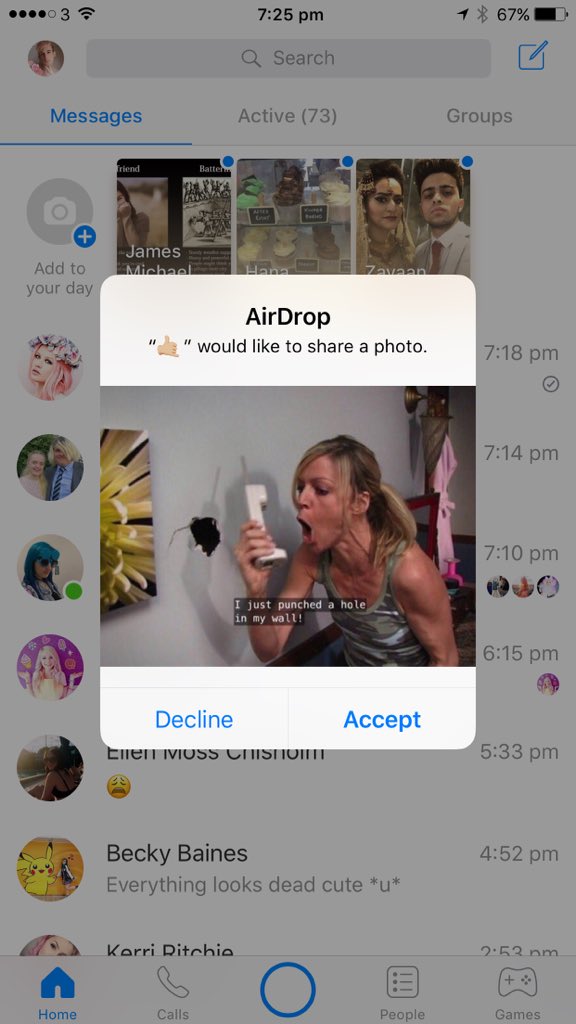
A GIF in which someone says they just made a hole in the wall ... Thanks for the info!


Ver imagen en Twitter


Seguir


snacky boy™ @Lyocoro


Someone just sent me this on airdrop lmfao


2:27 - 7 ago. 2017
22 respuestas
Retweets
1919 me gusta


Información y privacidad de Twitter Ads


9. Hard as a rock


Like Nicholas Cage, The Rock is an ideal choice for trolling with AirDrop.


6 ago


dancing queen @sighlalisa


En respuesta a @vividmyg


IM@EMPTYING MY BLADDER


Seguir


ㅤً @vividmyg


I GOT SENT THEM BY SOME DUDE ON AIRDROP AT SITC WE WERE SCREAMING pic.twitter.com/ArWOHRg1Ha


6:12 - 6 ago. 2017


22 respuestas
Retweets
33 me gusta


Información y privacidad de Twitter Ads


10. Absurd humor


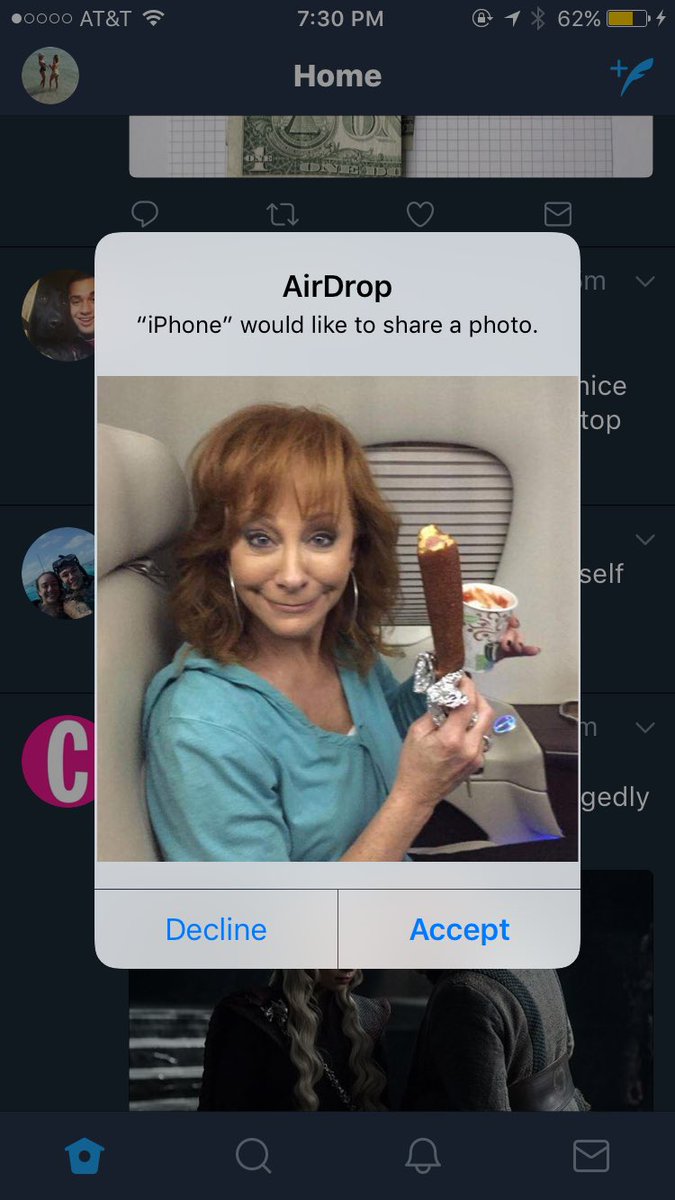
Who in his right mind would send an image as random as this? Fools never get bored ...


Ver imagen en Twitter


Seguir


the nanny named jacq @cuddleswagg


Don't leave your airdrop on


7:31 - 1 ago. 2017
1una respuesta
Retweets
33 me gusta


Información y privacidad de Twitter Ads


11. WTF?


When you leave AirDrop on, things can go wrong without any sense.


Ver imagen en Twitter



Seguir


NOAH SAW MX 07.23.17 @noahmnot


I left my airdrop on by accident....


0:45 - 21 ago. 2017
1una respuesta
11 Retweet
33 me gusta


Información y privacidad de Twitter Ads


12. Oops ...


To "Mr. Be-Throw-Many-Fart "would like to share a photo.


Ver imagen en Twitter


Seguir


watson @Wat_mo


When you're at the @budlight summer concert series and you get a random air drop request from Sir Farts A Lot


9:24 - 18 ago. 2017
22 respuestas
Retweets
11 me gusta


Información y privacidad de Twitter Ads


13. Take it off now!


Someone sent you a cheated website to pass the driving test via AirDrop.


Ver imagen en Twitter


Seguir


rat cake @shoehands


I'm at the DMV and some child just tried to airdrop a cheat sheet for the permit test into my phone!!


3:46 - 18 ago. 2017
55 respuestas
33 Retweets
1212 me gusta


Información y privacidad de Twitter Ads


14. Learning to call ...


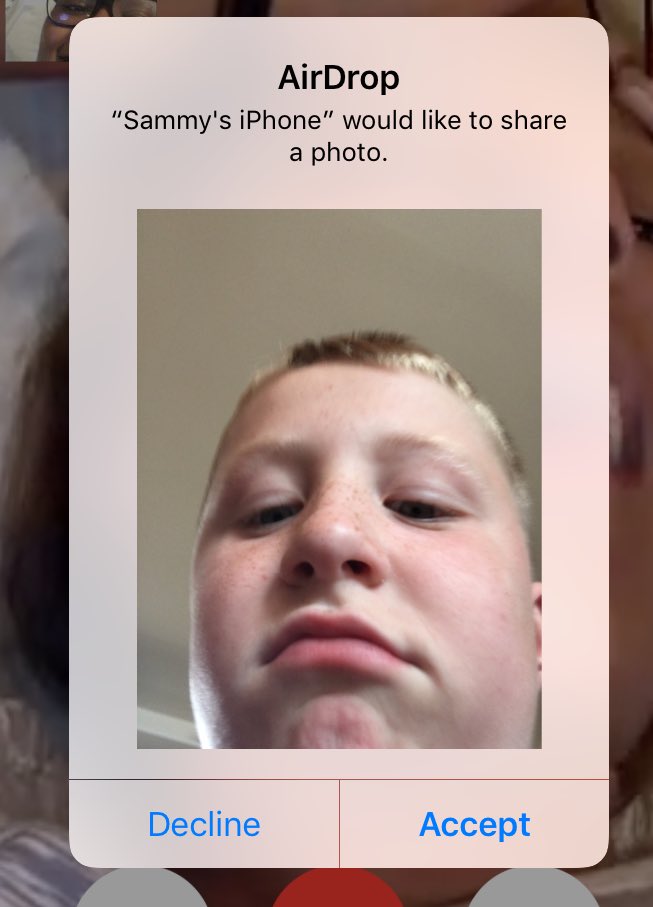
Instead of sending her his phone number for AirDrop, this boy decided to send a photo of his face to a girl on the train by AirDrop.


Ver imagen en Twitter


Seguir


Autumn @vanillaeve


i thought it'd be cute to have someone air drop me their number but instead this happens on the train:


21:36 - 17 ago. 2017
44 respuestas
11 Retweet
77 me gusta


Información y privacidad de Twitter Ads


15. Your finger is gone!

This woman sent a photograph of her face and a plate of food to a man sitting next to her. It was just a mistake.Must Read:If you lost data after you updated to a new iPhone, you can always use Gihosoft iPhone Data Recovery to get the data back from the old iPhone or backup.
Gihosoft Free iPhone Data Recovery:iphonerecovery.com


Seguir


lil slump @bango21_


So I'm sitting at the train station when all of a sudden I receive an air drop LMFAO


7:26 - 11 ago. 2017
33 respuestas
Retweets
66 me gusta


Información y privacidad de Twitter Ads


16. Pezqueñines no, thanks Must Read:iMyFone D-Back iPhone Data Recovery–Recover Deleted Data from Your iPhone/iTunes/iCloud Easily! https://www.imyfone.com/iphone-data-recovery/


In the aquarium, this boy received an image of a fish asking for his son.


How to Fix “Errors Occurred During iTunes Installation” on Windows 10/8/7
Find iTunes Installation Package


If you have been having problems with installing iTunes or its updates on your Windows 10/8/7, you may need to find and copy iTunes installation package. Once you encounter the error, don’t click "finish" on the installation dialog. Instead, leave that dialog open and follow these steps.


Step 1: Open Windows Explorer and type "%temp%" in the address bar. Then hit the "Enter" button on your keyboard.


Step 2: You will be directed to a page titled "C:\Users\Your Username\appdata\local\temp". Once you are on this page, look for a folder called "iTunes64Setup.log". If you use a 64-bit system or "iTunes32Setup1850.log" if you use a 32-bit system.


Step 3: Once you find the folder, open it and scroll down. You need to look for these key files: "C:\windows\system32\msiexec.exe", "C:\Users\Crusisxx\AppData\Local\Temp\IXP593.TMP\iTunes64.msi" and "INSTALL_SUPPORT_PACKAGES=1". You will find them in a temp called "IXP593.TMP".


Step 4: Once you open the temp folder, copy all the installation packages there, create a new folder on your desktop and paste them there.


Step 5: After doing this, you can now click "finish" on the iTunes installer dialog.


Step 6: From the new folder you created on your desktop, run "iTunes64.msi" or "iTunes.msi". After doing this, you can now run the iTunes installer.


This process may be a bit complex but if you follow it exactly, your iTunes should install successfully.
3. Disable Conflicting Software


The error could also be caused by conflicting software on your Windows 10. You can try to fix it by disabling the conflicting software. Here are some steps you can follow:


Step 1: Ensure you have the latest Microsoft Windows Updates. If you don’t, you can visit their website here.


Step 2: Ensure that you have the latest supported version of iTunes for your pc.


Step 3: Temporarily disable or uninstall conflicting software like security or antivirus. The iTunes installation processes may be red flagged by this security software.


Step 4: Restart your computer and then install iTunes again.If you accidentally deleted or lost videos on iPhone, first please check on the Recently Deleted folder. Alternatively, you can use the professional tool Gihosoft iPhone Recovery to recover deleted iPhone videos from Camera Roll or some apps.


Ver imagen en Twitter


Seguir


໊ @anatenma


i was. at the museum in the aquarium part and domeone airdropped this to my phoen i


4:20 - 27 ago. 2017
181181 respuestas
39.71839.718 Retweets
96.31096.310 me gusta


Información y privacidad de Twitter Ads


Via | Mashable

Call of Duty: Mobile Now Available for Download for iPhone and Android

If you are a fan of battle royale games and first-person action shooters like PUBG and Fortnite, there’s a new game in town for you. Activis...